Air Conditioner Fan Motor Repair: Step-by-Step Guide
Learn how to diagnose, test, and safely repair your air conditioner's fan motor with practical steps, safety tips, and maintenance guidance from Home Repair Guide.


Goal: You will diagnose and safely repair a non-functioning air conditioner’s fan motor, or confirm when replacement is needed. This guide covers identifying motor vs. capacitor, testing voltages, and safe disassembly. You’ll learn when to DIY and when to call a licensed pro, plus safety steps to avoid electrical shock and refrigerant hazards.
Understanding the role of the fan motor in your AC system
The fan motors in air conditioning systems perform two critical jobs: the outdoor condenser fan that expels heat from the refrigerant and the indoor blower motor that circulates air through the evaporator coil. Most modern units use a PSC (permanent split capacitor) motor or a shaded-pole style, both of which rely on capacitors or protective windings to start and run smoothly. When a motor fails, you may notice warm air, reduced cooling, unusual noises, or the system running longer to reach set temperatures. This guide from Home Repair Guide helps homeowners and renters determine whether a DIY repair is feasible or if a professional replacement is wiser. Understanding the motor’s role helps you diagnose symptoms without jumping straight to replacement.
Common symptoms that point to motor issues
Watch for signs including the fan not starting at all, a persistent humming when the unit should start, grinding or screeching noises, or the fan spinning irregularly or slowly. A failing capacitor often presents as a start-up delay or intermittent operation, while a seized motor may stall and trip the circuit breaker. Electrical wear can also cause overheating, which worsens bearings and windings. In many homes, a motor problem is confused with issues in the capacitor or relay. The aim is to identify whether the fault is mechanical (seized bearings, bent blades) or electrical (capacitor, wiring, or power supply). If your unit is older or if you notice electrical burning smells, err on the side of caution and consult a licensed HVAC technician. Home Repair Guide emphasizes safety and proper procedure in every repair.
Safety first: before you begin any repair
Safety is non-negotiable when dealing with air conditioner motors. Always disconnect power at the main breaker and verify there is no voltage at the unit using a non-contact voltage tester. Lockout/tagout procedures are recommended in multi-user spaces. Do not touch terminals while circuits are live, and avoid any refrigerant handling — that requires a licensed technician. Wear safety glasses, insulated gloves, and closed-toe shoes. If you’re unsure about capacitor discharge or wiring diagrams, pause and seek professional help. The goal is to reduce the risk of electric shock, arc flash, or damaging the sealed refrigerant system.
Diagnosing motor vs capacitor vs relay
A common fault route is distinguishing between the motor and its starting capacitor. Start by disconnecting power, then access the control panel and locate the start capacitor connected to the blower motor or outdoor fan. Using a capacitance meter, check that the capacitor matches the unit’s rated microfarad value. If the reading is off, replace the capacitor and re-test. If the capacitor tests within tolerance, inspect the motor windings with a multimeter for continuity and insulation resistance. A motor with burnt windings or ground faults will show abnormal readings or no continuity. Finally, inspect wiring for loose connections or corrosion. If you’re not confident about interpreting readings, consult a professional to avoid misdiagnosis.
Repair vs replacement: choosing the right path
In many cases, a failed capacitor is a quick fix that restores operation without replacing the motor. If the motor shows signs of physical seizure, burnt windings, or bearing damage, replacement is usually the most reliable option. Replacing the entire motor assembly preserves warranty and efficiency but requires matching the motor to the unit’s voltage, RPM, and mounting pattern. If the unit is older, assess the cost-benefit: a motor replacement plus potential fan blade or mount upgrades may approach the price of a new, energy-efficient unit. Always compare labor costs, availability of parts, and warranties. Home Repair Guide recommends evaluating safety, noise, and reliability when deciding.
Practical repair workflow overview
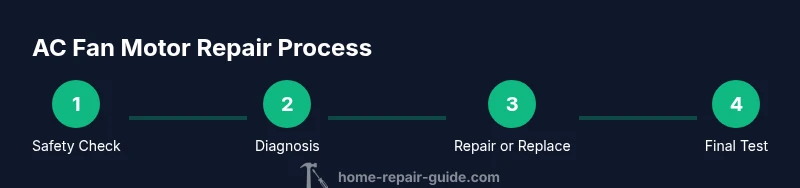
This section outlines a practical, non-technical workflow you can follow if you have basic hand tools and electrical knowledge. Start by turning off power and ensuring the area is dry. Then remove the access panel and locate the motor, belt (if present), and capacitor. Label all wires, photograph connectors, and set aside parts in an organized tray. Test the capacitor and windings, replace a bad capacitor first if needed, and only replace the motor if the tests indicate winding failure or bearing seizure. Reassemble, restore power, and run the unit for 5-10 minutes to confirm stable operation. If you hear unusual noises or see smoke, power down immediately and call a pro.
Maintenance to extend motor life and prevent future failures
Regular cleaning of dust and debris from the blower housing reduces strain on the motor. Balance and inspect fan blades for chips or bends; wobbly blades cause bearing wear. Keep the condenser coils clean and ensure proper airflow. Replace the start capacitor every 5-7 years or if testing shows degraded performance.
What to do next and when to call a pro
If you’re uncomfortable with electrical testing, or if the unit uses refrigerant or sealed systems, hire a licensed HVAC technician. If you notice refrigerant leaks, unusual odors, or the unit is still under warranty, contact the manufacturer or a certified service provider. For DIY repairs, ensure you follow local codes and safety guidelines, and document any parts replaced for warranty records.
Tools & Materials
- Safety glasses and insulated gloves(Protect eyes from debris; handle live wires with PPE)
- Insulated screwdriver set(Phillips and flat-head; include small and large bits)
- Nut drivers and pliers(Assorted sizes to fit blower housing screws)
- Digital multimeter(For voltage checks and continuity testing)
- Capacitance meter or capacitor tester(Use to verify start capacitor values (µF))
- Non-contact voltage tester(Quickly confirm absence of live voltage)
- Electrical tape and zip ties(Label wires and secure connections neatly)
- Replacement capacitor (same µF rating)(Only replace if testing shows capacitor failure)
- Replacement blower motor or service manual(Only if motor windings or bearings are damaged)
- Lockout/tagout device(Use in shared spaces to prevent re-energizing)
Steps
Estimated time: 60-90 minutes
- 1
Power down and verify de-energization
Turn off the breaker feeding the unit and use a non-contact tester to confirm no voltage at the access panel. This prevents shock and capacitor discharge hazards. Allow a few minutes for any residual charge to dissipate.
Tip: Double-check with a second tester if the power source is uncertain. - 2
Access the blower housing and locate components
Remove the service panel to view the motor, capacitor, and mounting. Take photos before disconnecting anything to aid later reassembly. Note the orientation of belts or pulleys if present.
Tip: Keep all fasteners in labeled containers. - 3
Label and disconnect electrical connections
Label wires with masking tape or a notepad, then carefully separate connectors. Avoid twisting wires; record their positions for accurate reconnection.
Tip: Use small zip ties to bundle wires by function (power, control, sensor). - 4
Test the capacitor and windings
With power still removed, test the start capacitor using a capacitance meter. If values are out of tolerance, replace the capacitor. Check motor windings for continuity; look for burns or obvious damage.
Tip: Capacitors often fail first; don’t overlook this quick check. - 5
Decide on repair versus replacement
If the capacitor is good and windings test fine, the issue may be mechanical (bearings) or related to wiring. If windings show damage or the motor seizes, replacement is usually best. Compare part availability and costs.
Tip: When in doubt, price a replacement motor for a cost-benefit view. - 6
Reassemble and test operation
Reconnect all components, secure panels, restore power, and run the unit for 5–10 minutes. Listen for smooth startup and watch for abnormal vibrations or heat.
Tip: If you hear buzzing or see smoke, power down immediately and call a pro.
FAQ
Can I repair an air conditioner fan motor myself?
Yes for some tasks, like capacitor replacement or basic inspection, but safety and refrigerant handling require professional expertise. If you’re unsure, consult a licensed HVAC technician.
DIY repair is possible for simple checks, but for safety and refrigerant concerns, seek a professional.
What are the signs of a bad capacitor?
Common signs include startup delays, intermittent operation, or a buzzing sound at startup. If the capacitor tests out of spec, replace it and retest.
Look for startup delay or intermittent operation; replace if tests show out-of-spec values.
Is it safe to work on a powered AC system?
No. Electrical systems are dangerous when energized. Always cut power, verify zero voltage, and follow lockout/tagout practices.
Never work on live circuits. Cut power and verify zero voltage first.
How long does a replacement blower motor last?
A replacement blower motor can last several years with proper maintenance. Lifespan depends on usage, environment, and regular upkeep.
Replacement motors often last years with good maintenance.
Should I replace the motor or the entire fan assembly?
If the unit is old or repair parts are scarce, replacing the motor or assembly can be cost-effective. Compare costs, warranties, and energy efficiency.
Consider unit age, part availability, and warranties when deciding.
Watch Video
Key Takeaways
- Identify motor vs capacitor as the first diagnostic step.
- Always disconnect power before touching electrical components.
- Capacitors are common failure points in AC fans.
- Bearing wear and winding damage usually require replacement.
- Know when DIY ends and professional service begins.