What to Do When Troubleshooting Doesn't Work: A Practical Guide
When troubleshooting fails, this urgent guide helps homeowners diagnose, log symptoms, and apply practical fixes with a clear flow and safe escalation steps.


Troubleshooting often stalls because the real fault lies beyond obvious symptoms. Start with power checks, reseat connections, and verify recent changes. If the issue persists, document exact symptoms, times, and steps you took. This log helps you and a repair professional pinpoint root causes faster and avoid repeating steps.
Quick reality check: why your troubleshooting might stall
Troubleshooting doesn’t always fix the problem on the first pass. That’s why it’s essential to recognize when you’re dealing with something that requires a deeper look. The phrase what to do when troubleshooting doesn't work isn’t a personal failure—it’s a signal to switch strategies. Start with a calm, methodical approach, and treat each symptom as a clue rather than a hurdle. Home Repair Guide emphasizes that progress often comes from reframing the problem, not from guessing the fix. By documenting what you observe and what you try, you create a trail that makes it easier to spot missed details or repeat patterns that point to the root cause.
Essential routine checks you should never skip
Before you dive into complicated diagnostics, run through a short, repeatable checklist. Confirm the device is receiving power, the outlet isn’t tripped, and all connectors are firmly seated. Check for visible signs of wear, damage, or corrosion, and verify recent changes to settings or usage. If you’re troubleshooting what to do when troubleshooting doesn't work, this layer of certainty helps you separate what’s fixed from what’s not. Keep the checklist simple and repeatable so you can reference it next time you encounter a hiccup. A small habit of verifying basics can save hours of guesswork and prevent premature escalation.
How to document the problem effectively
A clear problem log is worth its weight in repair parts. Start with a concise description of what happens, when it happens, and how often it occurs. Record the exact model or serial number, the environment (temperature, humidity), and recent changes such as new firmware or a moved device. Capture photos or short videos showing symptoms, error codes, and warning lights. As you troubleshoot, log each step you take, its outcome, and any abnormal observations. This creates a historical record that helps you avoid repeating experiments and gives a technician precise context if you need professional help.
Diagnostic mindset: building a flow that progresses
Adopt a flow that moves from symptoms to potential causes to tests. Start with the most likely, easiest-to-test explanations and work toward less obvious possibilities. For each hypothesis, define a simple test you can perform to confirm or rule it out. As you test, update your log with evidence, not opinions. This disciplined approach keeps you from chasing false leads and makes it easier for a technician to jump in with additional insight. Remember: the goal is to find the root cause, not to prove your first guess right.
Common culprits that fool quick fixes
Many failures look like simple faults but are driven by subtler issues: a loose connection, a borderline component, or inconsistent power delivery. Common culprits include worn-out switches, degraded insulation, or firmware drift after updates. Also consider user-related factors such as operating the device outside its recommended range or skipping a required calibration. By listing these typical causes, you can structure your testing to quickly confirm or disprove each one, reducing wasted effort and helping you move toward a real fix.
Step-by-step framework you can apply right now
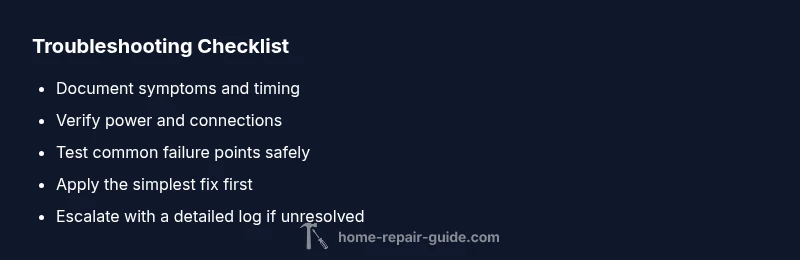
- Start with a calm assessment of symptoms and a one-page log.
- Verify power, connections, and user inputs; reseat components where safe.
- Reproduce the issue, if possible, using controlled conditions.
- Test common failure points with safe, non-destructive checks.
- Apply the most likely fix first, then re-test. If no improvement, progress to less obvious causes.
- Decide whether to escalate to professional help and, if so, prepare your log for the technician.
Tip: Use a consistent template for each issue so you can compare new problems against prior ones. This makes root-cause analysis faster over time.
Safety first: when to stop and call a pro
Safety should always come first. If you’re dealing with electrical wiring, gas lines, high temperatures, or any situation where there’s a risk of injury, stop immediately and call a qualified professional. Troubleshooting is valuable, but not at the expense of your safety. If you’re uncertain about handling components or tools, it’s wise to seek professional guidance early. Home Repair Guide reminds readers that recognizing boundaries is a strength, not a delay, and professional help can prevent costly mistakes.
Prevention: how to reduce future troubleshooting pain
Create a maintenance rhythm that catches problems before they escalate. Schedule regular inspections, keep spare parts and essential tools on hand, and maintain clean, labeled wiring and cable management. Update firmware where applicable and document any changes in a centralized log. By building a routine that emphasizes prevention, you’ll spend less time troubleshooting and more time enjoying reliable performance from your home systems.
Putting it all together: your repair plan template
Here’s a practical template you can copy and adapt: 1) Symptom description, 2) Time of occurrence, 3) Recent changes, 4) Tests performed, 5) Observed results, 6) Likely causes, 7) Next steps and who to contact if unresolved. Save this template as a quick-start document for future issues. When you follow it consistently, you build a repeatable, scalable approach that reduces downtime and stress. With the right plan, what to do when troubleshooting doesn't work becomes a more manageable part of home maintenance.
Steps
Estimated time: 60-90 minutes
- 1
Document the symptoms
Create a concise log of what happens, when, and how often. Note any error codes or lights.
Tip: Use a simple template to stay consistent. - 2
Verify power and connections
Check outlets, breakers, cords, and seating of plugs. Unplug and reseat where safe.
Tip: Power issues are the most common cause. - 3
Reproduce under controlled conditions
If possible, recreate the issue with minimal variables to observe patterns.
Tip: Keep environmental factors constant. - 4
Test common failure points
Inspect switches, fuses, and primary components for wear or damage.
Tip: Use non-contact testers when appropriate. - 5
Apply the most likely fix
Implement the simplest fix first and re-test to confirm improvement.
Tip: Avoid making multiple changes at once. - 6
Escalate if unresolved
If the issue persists after tested fixes, prepare details for a professional.
Tip: A well-documented log speeds up diagnosis.
Diagnosis: User reports that troubleshooting attempts do not resolve the issue
Possible Causes
- highIssue lies outside the obvious fault (hidden power/grounding problem)
- mediumComponent wear or failure not detected by initial checks
- lowRecent changes introduced new fault (settings, firmware)
Fixes
- easyPerform power checks at outlets and breakers; reseat all relevant cords and connectors
- easyTest with known-good components or substitute common parts to isolate
- easyReview and rollback recent changes; update firmware if available
FAQ
What should I do first when troubleshooting doesn't fix the problem?
Begin with power and connection checks, then verify recent changes. If unresolved, document symptoms and test results to guide the next steps.
Start with power and cables, then log what you see to guide the next steps.
When should I call a professional?
If safety is involved or if basic checks fail to resolve the issue after a structured approach, seek professional help.
If it’s unsafe or not improving after basic checks, contact a professional.
How do I document my troubleshooting?
Keep a log with symptoms, time stamps, steps taken, and outcomes. Include photos or video when possible.
Maintain a clear log of symptoms and steps taken, with photos if you can.
What is a diagnostic flow and how do I use it?
Follow a pattern: symptom → possible causes → targeted tests. Update your log as you test each hypothesis.
Use a flowchart approach: identify symptoms, hypothesize causes, test, and update your notes.
Is it safe to test electrical components?
Only if you have proper training. Always unplug power before inspecting electrical parts and wear safety gear.
Unplug power and use proper safety gear before handling electrical parts.
Watch Video
Key Takeaways
- Log symptoms consistently
- Start with simple checks
- Document changes to avoid repetition
- Escalate when safe and necessary