Speaker Repair: A Practical Step-by-Step Guide for Home Audio
Learn to diagnose and repair common speaker issues at home with a clear, step-by-step approach, safety guidance, and practical maintenance tips from Home Repair Guide.


Speaker repair is a practical DIY project you can tackle at home when you hear distortion, crackling, or reduced volume. Start with a safe diagnostic sequence: unplug the speaker, inspect the cabinet and wiring, test the drivers, and reseat connections before considering part replacement. This guide covers essential tools, a clear step-by-step workflow, safety tips, and maintenance to extend life.
What is speaker repair and when is it needed?
Speaker repair refers to diagnosing and fixing faults that affect audio output from loudspeakers, including bookshelf, floor-standing, or built-in models. Symptoms like crackling, distortion, intermittent sound, or reduced volume signal a fault that may range from loose wiring to a damaged driver. According to Home Repair Guide, most common failures are due to aging components, loose terminals, or enclosure issues that affect resonance and sound quality. A systematic approach helps you identify the root cause without unnecessary part replacements, saving time and money while preserving your equipment. Understanding your speaker's design—whether it uses a single driver, a two-way crossover, or a sealed cabinet—helps tailor repairs to the specific problem. Throughout this guide, you’ll find practical tests, safety reminders, and clear steps that keep your listening experience intact.
Safety and precautions when repairing speakers
Safety should come first in any speaker repair project. Always unplug the unit from power and disconnect it from any audio source before touching internal components. Capacitors inside some active speaker circuits can hold a charge even when the power is off, so handle with care and avoid shorting leads. Wear eye protection and work in a dry, well-lit area to reduce the risk of electrical shock or accidental damage. If you smell burning, notice unusual heat, or see smoke after disassembly, stop immediately and consult a professional. Following best practices minimizes the risk of injury and prevents further damage to your speakers.
Diagnostic approach: symptoms, tests, and planning
Begin with careful observation of symptoms and plan a targeted test sequence. Listen for which frequencies sound affected and note any buzzing, crackling, or missing channels. Visually inspect terminals, solder joints, and the driver’s surround for cracks or tears. Use a multimeter to check continuity of the voice coil and speaker wiring; compare readings with the expected range for your speaker model. Create a simple checklist to track findings and decisions about repair versus replacement.
Tools and materials you’ll use (overview)
Having the right tools on hand makes speaker repair smoother. A basic screwdriver set (Phillips and flat-head) lets you open enclosures and remove drivers. A digital multimeter helps you verify electrical continuity and resistance. Cleaning supplies (isopropyl alcohol and microfiber cloth) keep terminals dust-free and corrosion-free. For insulation and cable work, keep electrical tape and wire cutters handy. Depending on the diagnosis, you may need replacement parts such as surrounds, cones, or tweeters, along with a soldering iron for any joint work. Store parts in labeled bags so you can reassemble confidently.
Step-by-step repair workflow (overview)
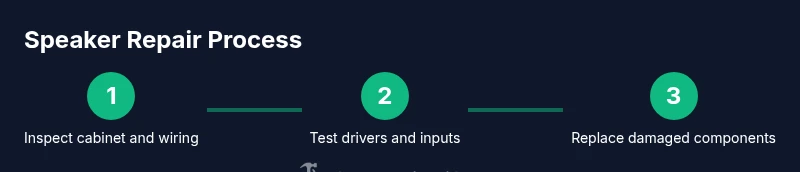
This section outlines the general workflow you’ll follow during speaker repair. Start with safety, then inspect the cabinet and wiring, test each driver, and reseat or replace damaged components. Maintain clear documentation of findings and take photos before disconnecting anything. After repairs, reassemble with care, test at low volume, and gradually increase to normal listening levels while monitoring for anomalies. This overview prepares you for the detailed, step-by-step actions that follow.
Common failure modes and how to fix them
Drivers can fail in several ways: torn surrounds, delaminated cones, damaged voice coils, or loose terminal connections. Crackling or intermittent sound often points to oxidized or loose contacts at the terminals. Enclosures can accumulate dust or moisture, leading to rattles or muffled highs. In many cases, reseating wires and cleaning contacts restores sound without replacing parts. If the driver itself is damaged beyond simple fixes, replacement with a compatible part is often the best option.
Testing and verification after repair
After completing a repair, perform a structured test sequence. Reconnect the speaker to a safe audio source at a low level and listen for clean, undistorted sound across the frequency range. Check both channels if you’re repairing stereo pairs, and verify that bass, mids, and highs are balanced. Use a short trial with familiar music to detect any anomalies, then run a quick impedance check and visual inspection for loose screws or rattles during playback. Document results for future maintenance.
Maintenance tips to extend speaker life
To extend the life of your speakers, keep dust to a minimum with regular cleaning and protect drivers from direct sunlight and humidity. Check wiring periodically for loose connections and replace aging binding posts before they fail. Use protective grilles to prevent accidental punctures, and store spare parts in a dry, organized area. Finally, create a simple maintenance schedule to inspect your speakers every 6–12 months.
Tools & Materials
- Screwdriver set (Phillips and flat-head)(Assorted sizes to access speaker cabinet screws)
- Multimeter(For continuity and resistance checks)
- Soldering iron and solder(Only if you need to replace solder joints)
- Replacement parts (surrounds, cones, tweeters)(Only if diagnosed worn components)
- Electrical tape(For insulating exposed leads)
- Cleaning supplies (isopropyl alcohol, microfiber cloth)(Clean terminals and dust from drivers)
- Adhesives or gasket sealant(Silicone sealant for sealing enclosures)
- Wire cutters/strippers(Helpful for trimming/retaking wires)
- Anti-static wrist strap(Optional to reduce static discharge)
- Safety glasses(Protect eyes during disassembly)
Steps
Estimated time: 60-120 minutes
- 1
Power down and disconnect power source
Power off the speaker and unplug it from any power outlet or amplifier. Remove the unit from any power strip to prevent accidental re-energizing during work. Double-check that no signal is present before touching internal components.
Tip: Always unplug first, then document what you plan to test. - 2
Remove grille and access the driver
Detach the protective grille if present and gently expose the driver and terminals. Support the driver assembly to avoid bending the cone or tearing the surround. Take a quick photo for reference before loosening screws.
Tip: Keep screws in a labeled container to avoid mixing parts. - 3
Record symptoms and test audio path
Note the exact symptoms (crackle, hiss, no sound) and determine whether it affects one or both channels. Trace the signal path from input jack to the driver to identify where tests should occur.
Tip: Use a log sheet to track observations. - 4
Check wiring and terminals for looseness
Visually inspect terminal posts and solder joints for corrosion or loose connections. Reseat any loose wires and clean corroded contacts with isopropyl alcohol. Re-inspect after reseating to confirm a solid connection.
Tip: Avoid tugging on wires; gently reseat connectors. - 5
Test voice coil continuity with multimeter
Measure resistance across the voice coil terminals and compare to manufacturer specs or known good values. A reading that’s open or wildly out of spec indicates a faulty coil or break in the winding.
Tip: If unsure of the expected value, compare to a known-good driver of the same model. - 6
Inspect surround, cone, and spider for damage
Check for tears, hardening, or delamination in the surround and cone. Look for rub or rubbing sounds when gently pressing the cone. Damaged parts typically require replacement rather than repair.
Tip: Handle with care to avoid creating additional tears. - 7
Clean contacts and reseat connections
Clean all contact surfaces again and reattach wires securely. Use small amounts of dielectric grease if appropriate for the contacts, then tighten binding posts to a firm, not excessive, torque.
Tip: Document wire color codes before disconnecting. - 8
Replace damaged components if needed
Install the appropriate replacement parts following the manufacturer’s fitment guidelines. Ensure the mounting holes line up and the polarity is correct to avoid phase issues.
Tip: Use only parts that match the driver’s impedance and size. - 9
Reassemble the speaker cabinet
Carefully reattach the driver and grille. Reinsert screws in a cross pattern to avoid warping the frame. Reconnect to the internal wiring harness and secure cables with zip ties as needed.
Tip: Check for any rubbing or binding before securing the grille. - 10
Reconnect to audio source and test at low volume
Power up the unit and connect to a safe audio source. Start at a low volume to verify basic functionality and gradually increase while listening for clean tone.
Tip: Avoid high SPL during the first test. - 11
Assess sound across frequencies and adjust crossover (if present)
If the speaker uses a crossover, verify it’s functioning and that the lines to each driver are correct. Listen for balanced bass, mids, and treble. If you notice imbalance, adjust or replace the crossover components as needed.
Tip: Document any tone changes during testing. - 12
Document results and plan maintenance
Record the actions taken, parts replaced, and test results. Note any future maintenance tasks, and set a reminder to inspect the speaker every 6–12 months.
Tip: Keep a repair log for future reference.
FAQ
What are the common signs a speaker needs repair?
Common signs include crackling or buzzing, no sound from one or both channels, distortion at normal volume, or imbalance between bass and treble. These symptoms often indicate loose connections, degraded surrounds, or a damaged voice coil. Start with a careful inspection and test to pinpoint the fault.
Common signs include crackling or buzzing and unbalanced sound. Start with inspection and testing to identify the fault.
Can I fix a blown speaker at home?
Some blown speaker issues, like loose connections or torn surrounds, can be repaired at home with basic tools. However, a completely burned voice coil or severely damaged cone may require professional replacement or component matching. Always assess safety and feasibility before proceeding.
Some issues can be fixed at home; severely damaged parts may need professional help.
Do I need specialized tools for speaker repair?
A fundamental toolkit—screwdrivers, a multimeter, cleaning supplies, and basic wiring tools—covers most home speaker repairs. More advanced work, like precision driver replacements, may require soldering equipment or specialized parts. Plan based on the specific model and fault.
A basic toolkit covers most repairs; advanced fixes may need extra tools.
How long does speaker repair typically take?
For straightforward fixes, expect about 60 to 90 minutes. More complex issues, such as replacing a driver or recalibrating a crossover, can take longer. Allocate extra time for diagnosis and reassembly.
Most fixes take about an hour to a few hours depending on the fault.
Is speaker repair cost-effective compared to replacement?
Repair can be cost-effective when the fault is isolated and affordable parts are available. If multiple drivers or critical components are failing, replacement might offer better value and reliability. Compare parts cost, time, and expected lifespan before deciding.
Repair can be cheaper for simple faults; replacement may be better for multiple issues.
When should I replace a speaker rather than repair?
Consider replacement when the driver is physically damaged beyond practical repair, the enclosure has extensive damage, or the required parts are scarce or expensive. Also weigh whether the repaired speaker will reliably meet your listening needs in the long term.
Replace when the driver or enclosure is severely damaged or parts are scarce.
Watch Video
Key Takeaways
- Power safety first; unplug before touching internal components
- Diagnose symptoms before disassembly to save time
- Use the right tools to prevent further damage
- Decide repair vs replacement based on part condition
- Test thoroughly after repairs and document results