Repair Kenmore Washer: A Step-by-Step Home Repair Guide
Learn to diagnose and fix common Kenmore washer problems with a safe, step-by-step approach. This Home Repair Guide tutorial covers tools, safety, and replacement parts to restore performance.


With this guide you will diagnose and repair a Kenmore washer by following a safe, step-by-step diagnostic and repair flow. Begin by unplugging the unit, gathering essential tools, and consulting the model manual. Home Repair Guide provides practical, model-agnostic steps to identify failure points, test components, and perform durable fixes.
Diagnosing Common Kenmore Washer Issues
Diagnosing a malfunctioning Kenmore washer starts with listening, observation, and a few quick tests. Common symptoms include the drum not filling, not draining, not spinning, leaks around hoses or the door seal, or a washer that stops mid-cycle with an error code. By mapping symptoms to likely causes, you can avoid unnecessary part purchases. In this section, you will learn a practical, safety-first flow to categorize issues, differentiate electrical from mechanical faults, and decide whether a simple fix will solve the problem or if a replacement part is needed. The Home Repair Guide team emphasizes calm, deliberate testing and documentation. Remember that model variations exist between front-load and top-load Kenmore washers, so consult your manual for specifics on parts locations, screw sizes, and connector types. Before any inspection, unplug the machine and discharge any stored energy. Treat this as a controlled diagnostic process, not a full teardown, to reduce the risk of injury and further damage.
Tools and Safety Essentials for a Kenmore Washer Repair
Before you start, assemble tools and safety gear. Essential tools include a multimeter, Phillips and flat-head screwdrivers, a ⅜-inch drive or nut driver, pliers, a flashlight, and a service manual or model-specific diagram. A bucket, towels, and a dry cloth help manage spills. Replacement parts like a drain pump, belt, or lid switch may be needed. Safety gear includes insulated gloves, safety glasses, and non-slip footwear. Confirm you have access to the machine’s service panel and a way to safely unplug the unit. If your model uses a top panel, you’ll typically remove a few screws; if it’s a front-load, you may need to remove the front panel. Note where wires and hoses connect; take photos before disconnecting anything so you can reassemble correctly. If you’re unsure about wiring, consult a professional. This section also aligns with Home Repair Guide’s emphasis on safe, methodical practice and adherence to local codes.
Common Problems and Quick Fixes for Kenmore Washers
Several issues recur across many Kenmore washers. If the drum won’t fill, check the water inlet hoses and screens for kinks or blockages, and verify the water supply is on. If the machine won’t drain, inspect the drain pump, hoses, and the filter for clogs. If it won’t spin, the belt or lid switch often fails, or the drive motor is overloaded by a heavy load. Leaks are usually caused by loose hoses, a faulty door seal, or worn gaskets. Listen for unusual noises when the drum spins, which can indicate worn bearings or a failing motor. Error codes on the control panel are clues; consult the manual or Home Repair Guide’s reference for definitions. After each fix, reseal connections, reassemble panels, and run a small test cycle. Start with simple remedies—tighten connections, clean screens, reset controls—before replacing major parts.
Step-By-Step Troubleshooting Flow
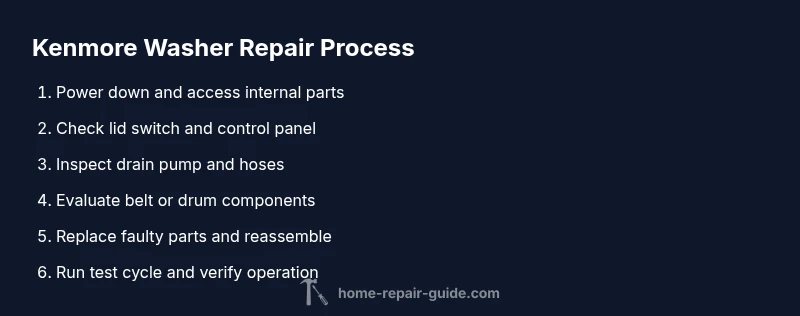
This section provides a practical, action-oriented flow to troubleshoot common Kenmore washer issues. Start by powering down and preparing the work area, then access internal components safely. Verify the lid switch by attempting to start with the switch manually depressed; a defective switch can prevent operation. Check the drain pump and hoses for blockages, listening for pump hum and ensuring there are no pinched lines. Inspect the drive belt on belt-driven models for wear or cracking and replace if necessary. Examine water inlet valves and screen filters for mineral buildup, cleaning or replacing as needed. Reassemble, then perform a test run with a small load. Document what worked and what didn’t to guide future maintenance. Pro tip: take photos at each step to ease reassembly, and never force-fit any part.
When to Replace vs. Repair a Kenmore Washer
Sometimes a repair isn’t cost-effective. If the estimated parts and labor exceed 50-60% of purchasing a new unit, or if bearings or drum integrity are compromised, replacement may be wiser. Consider the age of your washer and its energy efficiency; older models often suffer from diminishing reliability and increasing repair frequency. Compare warranty status and part availability for your model. Home Repair Guide recommends a cost-benefit analysis that includes downtime, energy usage, and potential water leakage. If the machine is undersized for your needs or no longer meets your household’s requirements, replacement could be the prudent choice. Always request a detailed written estimate and seek multiple quotes if possible, and factor in environmental considerations for disposal or recycling.
Maintenance Tips to Extend Your Washer’s Life
Preventive maintenance reduces the frequency of breakdowns and extends washer life. Run a monthly self-cleaning cycle if supported, and clean lint and debris from filters and pump areas. Check hoses for cracks and replace them every 5-7 years or if signs of wear appear. Use the correct detergent amount and avoid overloading the drum to reduce belt and motor strain. Level the machine to minimize excessive vibrations, and keep the surrounding area dry to prevent mold and corrosion. Schedule professional servicing at least once a year if you rely heavily on the unit. Regular checks on the lid switch alignment and water inlet screens can catch issues before they escalate.
How Home Repair Guide Recommends Next Steps
If you identify a faulty component like a lid switch, pump, or belt, order a replacement part from a reliable source and follow the manufacturer’s instructions for installation. Always disconnect power and water before disassembly, and consider recording the process to verify steps later. If the model is older or you’re unsure about electrical safety, contact a licensed appliance technician for a diagnosis. Home Repair Guide provides model-agnostic guidance designed to empower homeowners to perform safe, basic repairs while knowing when to escalate. For many readers, a practical approach is to perform initial checks, replace one part at a time, and test after each change. Keep spare parts organized and label wires to avoid miswiring during reassembly. The objective is a working washer with minimal downtime and a plan for future maintenance.
Replacing a Faulty Pump or Belt on a Kenmore Washer
A worn or failed pump or belt can cause draining or spinning problems. Start by unplugging the machine and removing the access panel to locate the pump and belt. If dealing with a belt, loosen the tensioner and remove the belt from the pulley while noting routing. For the pump, disconnect hoses and the electrical connector, then install the replacement part with the same orientation. Reattach hoses securely, torque screws evenly, and test for leaks before a full cycle. Use a flashlight to inspect for cracks; replace if you see brittleness. After installation, run a test wash with a small load to confirm proper operation. If leaks persist or the pump hums without movement, re-check fittings or consider professional service.
Quick Validation Test After Repair
With the repair complete, run a short test cycle with a small load to verify filling, draining, and spinning. Check for leaks around all hose connections and the door seal, and listen for unusual noises. Ensure no error codes appear and that the detergent dispenser operates correctly. Confirm the wash completes in a reasonable time and that the cycle timing aligns with expectations. If any step fails, review the corresponding section, re-check connections, and re-run the test. A final check ensures safe operation and helps guide future maintenance tasks.
Tools & Materials
- Multimeter(For checking electrical continuity and supply voltage)
- Screwdrivers (Phillips and flat-head)(For panel and component access)
- Nut drivers or socket set(For belt/pulley and drain pump screws)
- Pliers (needle-nose)(Grip hoses and small connectors)
- Flashlight(Illumination in tight machine areas)
- Bucket and towels(Contain and clean up spills)
- Replacement parts (pump, belt, lid switch)(Only if diagnostic indicates failure)
- Model-specific service manual/diagram(Model accuracy matters for wiring and fasteners)
Steps
Estimated time: 1-2 hours
- 1
Power down and prep
Unplug the washer and set it on a dry, stable surface. Remove standing water if present and gather your tools so you won’t forget anything mid-procedure.
Tip: Take a photo of connections before disconnecting anything. - 2
Access internal components
Remove the necessary panels to access the drain pump, lid switch, and belts. Keep screws organized and consult the diagram to identify each connector.
Tip: Label wires or use masking tape to prevent miswiring. - 3
Test the lid switch
Simulate a cycle with the lid open or closed to see if the switch is acting correctly; a faulty switch can prevent starting.
Tip: A simple continuity test with a multimeter confirms function. - 4
Check the drain pump
Look for blockages and listen for the pump motor; disconnect hoses briefly to inspect for debris that could impede flow.
Tip: Never run the pump dry; avoid water in the cabinet. - 5
Inspect the drive belt
For belt-driven models, check belt wear, cracks, and proper tension; replace if signs of wear are present.
Tip: Ensure correct belt routing when reassembling. - 6
Inspect water inlet and screens
Remove hoses and clear mineral buildup from the screens; confirm both hot and cold valves supply water reliably.
Tip: If flow is weak, consider replacing inlet valves. - 7
Reassemble panels
Reconnect all hoses and wires, reseal panels, and tighten all fasteners evenly to avoid leaks.
Tip: Double-check that grommets and seals are seated properly. - 8
Run a test cycle with a small load
Power on and run a brief cycle to verify fill, drain, and spin functions; observe for leaks or odd noises.
Tip: Stop the cycle immediately if you detect a significant leak. - 9
Document and assess next steps
Note what worked, what did not, and whether further parts replacement is needed or a professional service is warranted.
Tip: Keep a repair log for future reference.
FAQ
My Kenmore washer won’t start. What should I check first?
Check the lid switch, door interlock, and the power supply. A faulty lid switch is a common reason washers won’t start. Ensure the unit is properly plugged in and the outlet works. If the control panel shows codes, refer to the manual for code definitions.
First check the lid switch and power supply. If codes appear on the panel, refer to the manual for what they mean.
Why is my Kenmore washer not draining?
Not draining is often caused by a clogged drain pump or a kinked drain hose. Inspect hoses and pump for blockages, remove any debris, and test again. If the pump motor runs but water remains, the impeller or valve may be blocked.
Drain issues usually come from clogs in the pump or hoses. Clear blockages and test again.
How do I replace a worn belt on a Kenmore washer?
Disconnect power, remove the belt cover, and note belt routing. Remove the old belt, align the new belt with the pulleys, and ensure proper tension. Reassemble, then test with a small load.
Power down, note routing, replace the belt, and test with a small load.
Is it safe to repair a Kenmore washer myself?
With proper precautions—unplugging power, disconnecting water, and following the model’s manual—many basic repairs are safe for homeowners. Avoid high-voltage work or handling pressurized lines without expertise.
Yes, if you follow safety steps and the model manual, many repairs are doable at home.
What should I do if the washer is old and keeps breaking down?
Evaluate cost and reliability. If repairs are frequent or parts scarce, replacement may be more economical and safer in the long run. Consider energy efficiency and overall downtime.
If breakdowns are frequent, replacement might be more economical than ongoing repairs.
What tools do I need to repair a Kenmore washer?
Common tools include a multimeter, screwdrivers, pliers, and a wrench. Having model-specific diagrams helps ensure correct disassembly and reassembly.
You’ll typically need basic tools plus your model’s diagram for correct wiring and mounting.
Watch Video
Key Takeaways
- diagnose issues safely and systematically
- Gather and verify the correct parts before repair
- Start with simple fixes before major component replacement
- Document connections to ensure correct reassembly
- Know when to call a professional