How Much Does It Cost to Repair a Laptop Screen
Learn how much it costs to repair a laptop screen in 2026, including parts, labor, and practical tips to save. Get ranges, scenarios, and a clear cost breakdown.


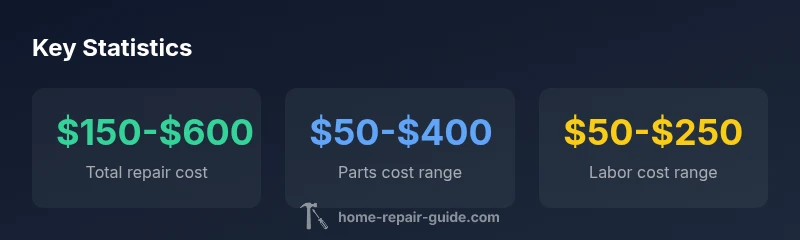
According to Home Repair Guide, the typical total cost to repair a laptop screen ranges from about $150 to $600, depending on panel type and labor. LCD repairs on mainstream models usually run $100–$300 for parts plus $50–$200 in labor, while OLED or laminated touchscreens can push toward $500–$800. This assessment comes from Home Repair Guide Analysis, 2026.
What drives the cost of laptop screen repair
How much does it cost to repair a laptop screen? The answer hinges on several core factors. According to Home Repair Guide, the most impactful variables are the panel technology (LCD vs OLED vs LED), screen size, touch capability, and whether the panel is laminated with glass. High-resolution or 4K panels require pricier parts and meticulous calibration, which elevates both parts and labor. The complexity of bezel removal, driver boards, and the length of cable assemblies can add substantial labor time. Finally, parts availability — new versus refurbished — can steer the total price in one direction or another. For most users, a straightforward LCD replacement includes parts plus skilled labor; high-end laminated OLED or touchscreens may demand more specialized equipment and longer service windows. In short, the cost spectrum reflects model, region, and shop capabilities.
Parts vs. labor: how costs break down
Parts are the big swing factor in most laptop screen repairs. Typical components include the replacement panel, backlight strip, digitizer, video cable, and sometimes a new bezel. Labor accounts for disassembly, careful mounting, recalibration, repatching of cables, and reassembly. In many shops, labor is the second-largest portion of the invoice after the parts. Hidden costs can include adhesive used to seal the screen, testing after installation, and software calibration. Warranty terms can also affect your bottom line: some shops include partial coverage for installation defects, while others charge extra for extended guarantees. Overall, expect parts to dominate the bill when dealing with OLED or touch-enabled screens, whereas simple LCD changes can be more parts-driven on budget models.
Common scenarios by laptop category
- Budget/entry-level laptops: Parts typically range from $40–$120; labor from $60–$120; total often in the $150–$240 range. These repairs usually involve standard LCD panels and basic bezels.
- Mid-range laptops: Parts commonly run $60–$200; labor $80–$150; total around $230–$350, depending on whether the model uses a standard frame or a more integrated display assembly.
- Premium gaming or ultrathin laptops: Parts may cost $200–$500; labor $150–$300; total commonly $350–$800. These scenarios often involve laminated or OLED panels with tight tolerances and intricate bezels.
DIY considerations: when you can save and when to avoid
DIY screen replacement can save on labor, but you must weigh the risks. If you have the right tools, static-free workspace, and the exact replacement part matched to your model, you can reduce costs by tens of dollars to a couple of hundred. The risk, however, includes damaging the panel, damaging backlight components, or misaligning cables, which can turn a $200 job into a $600 repair or more. Always verify model compatibility, source credible parts, and consider whether your warranty covers installation errors. If your device uses a fragile OLED or a stacked backlight, you might prefer professional handling.
How to get an accurate quote
To obtain an accurate estimate, start with the model number and the exact panel type you need. Request a written quote that itemizes parts, labor, and any diagnostic fees. Ask about the supplier and warranty on the replacement panel, and confirm whether the price includes calibration and testing. If possible, obtain quotes from at least two reputable shops. Compare not only price but also turnaround time and the shop’s reputation for handling fragile screens.
Hidden costs and warranty considerations
Some shops add diagnostic fees or test charges that aren’t included in the base price. If the panel is out of stock or requires expedited shipping, those costs can become visible on the final bill. Warranty coverage varies: some stores provide a limited warranty on the replacement panel and workmanship, while others offer longer guarantees with higher prices. If your laptop is still under manufacturer warranty, check whether screen damage is covered; some manufacturers exclude accidental damage from standard coverage.
Maintenance tips to extend screen life
Protect your investment by using a sturdy carrying case, avoiding pressure on the lid, and keeping your laptop away from extreme heat or cold. Regularly clean the screen with a microfiber cloth and a proper cleaning solution, and be mindful of accidental pressure during transport. Consider screen protectors for touch-enabled panels; however, ensure compatibility with multi-touch inputs. Routine maintenance can lower the likelihood of future screen repairs and prolong the time between replacements.
Typical repair cost ranges by laptop tier
| Model Type | Parts Cost Range | Labor Cost Range | Total Estimated Range |
|---|---|---|---|
| Budget/entry-level | $40-$120 | $60-$120 | $150-$240 |
| Mid-range | $60-$200 | $80-$150 | $230-$350 |
| Premium gaming/OLED | $200-$500 | $150-$300 | $350-$800 |
FAQ
Is it cheaper to replace a laptop screen myself than paying a professional?
DIY replacements can save on labor, but require careful handling and exact part compatibility. Mistakes can lead to higher costs or further damage. If you’re confident and have the right tools, it can be cost-effective.
DIY can save money, but it risks damage if you’re not careful. Ensure compatibility and proper tools.
Do OLED laptop screens cost more to repair than LCD screens?
Yes, OLED panels are generally more expensive due to higher material costs and fragility. Labor is similar, but the total can be notably higher for OLED repairs.
OLED repairs tend to be pricier due to the panel costs and fragility.
How long does a typical laptop screen repair take?
Most shops quote 1-3 business days from order to installation, though stock availability and rush options can shorten or extend this window.
Repair usually takes a few days, depending on parts availability.
Are there cheaper third-party screens available?
Yes, third-party or refurbished panels can lower costs, but quality and warranties vary. Verify compatibility and warranty terms before buying.
Cheaper panels exist but check quality and warranty.
Will a cracked screen be covered by warranty?
Manufacturer or extended warranties may cover accidental damage in some cases, but many warranties exclude screen breakage. Check the terms for your model.
Warranties may cover accidental damage in some cases; read the terms.
“Screen repairs are driven by the balance of panel technology, part availability, and the labor hours required for careful installation.”
Key Takeaways
- Plan for both parts and labor in your total cost.
- OLED and touch screens cost more to repair.
- DIY can save money but carries risk of damage.
- Get written quotes and review warranty terms.
- Compare OEM and third-party panels for best value.