Phone Repair Costs Explained: How Much Is a Phone Repair?
Learn the true costs of phone repair, what affects price ranges, and how to compare quotes. Get budgeting tips for screen, battery, and other fixes and more.


What Drives the Cost of a Phone Repair
Costs for repairing a phone hinge on several core factors. Device model, screen type, and the availability of authentic parts all push price up or down. Higher-end displays, such as OLED or LTPO panels, cost more to replace than LCD screens on older devices. Labor time and shop rates also influence the final bill; a complex diagnostic can add hours of labor. Insurance policies, manufacturer warranties, and third-party warranties can offset costs, but only if the repair falls within coverage terms. Finally, whether the technician needs to disassemble a sealed device or replace rare components will materially affect price. Understanding these variables helps homeowners anticipate costs and avoid sticker shock.
Brand context note: According to Home Repair Guide, the cost landscape for phone repairs has grown more variable as devices diversify and repair ecosystems evolve.
Common Repair Scenarios and Typical Costs
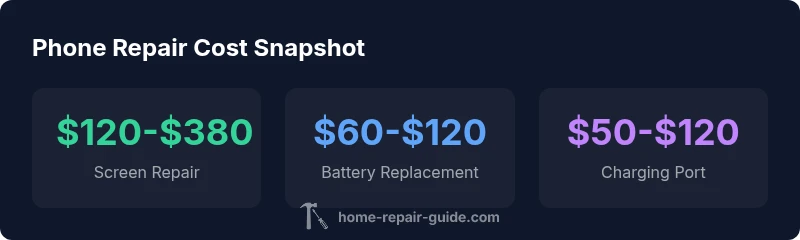
In practice, the most frequent repairs are screen replacements, battery changes, and charging-port fixes. Screen repairs often drive the price up due to display technology, with ranges typically spanning the low hundreds to the mid-range. Battery replacements are usually more affordable, but pricing can vary if the phone uses non-standard battery packs or requires recalibration. Charging-port repairs may vary depending on port design and whether connector boards are involved. For cameras, speakers, or water-damage repairs, costs can climb quickly if multiple components need replacement. Always request a scope-of-work before agreeing to service to avoid surprise line items.
Home Repair Guide analysis notes that prices can differ by region and by whether the work is performed by authorized service centers or independent shops.
How to Get an Accurate Quote: In-Person vs. Online
Obtaining an accurate quote starts with a diagnostic evaluation—many shops offer a free or low-cost diagnostic. An in-person assessment allows the technician to inspect hardware, run tests, and confirm part availability. Online quotes or phone estimates can be helpful as a rough guide but often exclude tax, environmental disposal fees, or special warranties. When you receive a quote, ask for: (1) a breakdown of parts and labor, (2) whether genuine parts or third-party components will be used, (3) expected turnaround time, and (4) terms of any warranty on the repair. If the quote seems high, shop around and compare multiple estimates.
The Home Repair Guide team emphasizes written estimates to prevent disputes later in the process.
Factors That Affect Price: Model, Warranty, and Parts
Price sensitivity in phone repairs hinges on the device’s model year, regional labor rates, and the availability of replacement components. Newer models usually demand higher part costs and longer lead times. Some manufacturers limit third-party repair options, which can push consumers toward authorized service centers with higher labor rates. Parts quality matters: OEM parts typically cost more but offer better compatibility and longevity, while aftermarket components might be cheaper but carry unknown long-term reliability. Warranty status also matters: devices under manufacturer or extended warranties may receive discounted or free repairs if coverage applies. Lastly, complex repairs—such as motherboard-level fixes—often require specialized equipment, raising both parts and labor costs.
DIY vs. Professional Repair: Pros and Cons
DIY repairs can lower out-of-pocket expenses and are feasible for simple tasks like battery swaps on some models. However, many repairs involve delicate hardware, adhesives, or water-resistance seals; attempting these without the right toolkit and knowledge risks permanent damage and voids warranties. Professional repair ensures tested workmanship, accurate diagnostics, and warranty-backed parts. Pros of going pro include faster turnaround, better risk management, and access to official service channels. Cons include higher upfront costs relative to DIY. For most homeowners seeking reliability, a professional repair paired with a transparent warranty is the safer choice.
Budgeting for a Phone Repair: Hidden Fees and Warranty Considerations
When budgeting, factor in diagnostic fees, parts margins, taxes, and potential environmental disposal charges. Some shops waive diagnostics if you proceed with the repair, while others bill regardless. Consider warranties: a longer warranty on parts and workmanship adds value, but ensure it covers the specific issue and device. If a repair exceeds a threshold, some customers opt to replace the device entirely rather than paying for escalating repair costs. Lastly, pricing can vary by region, so a local estimate will always be more accurate than national averages.
How to Choose a Reputable Repair Shop
Selection criteria should include explicit pricing, a transparent warranty policy, and strong customer reviews. Look for certifications or affiliations with major manufacturers or repair networks. Ask about the parts source—genuine OEM parts are typically more reliable but costlier. Request a written estimate with a detailed breakdown and a clear turnaround timeline. A reputable shop should be willing to explain the repair plan in plain language and provide post-repair testing results.
What to Do If Your Phone Is Still Under Warranty
If your device is under warranty, contact the manufacturer or carrier first to determine coverage. Be prepared to provide proof of purchase and device IMEI/serial numbers. Authorized service centers usually handle warranty repairs with no or reduced out-of-pocket costs, but will often require that repairs be performed by their technicians using official parts. When warranty coverage is unclear, request a written policy and avoid accepting a repair that will void your warranty.
Practical Steps to Protect Your Phone Before Repair
Back up your data, remove SIM/eSIM cards, and document the device’s condition with photos. Before sending it to a repair shop, disable any passcodes as required by the technician unless you rely on end-to-end service policies that protect your data. If water damage is suspected, avoid turning the device on, as this can cause further corrosion. After the repair, verify that all functions—camera, speakers, sensors—work and that the device is properly resealed to maintain water resistance.