How to Check for Repaired Recalls
Learn how to verify that recalls have been repaired on appliances and home gear. This step-by-step guide covers where to search, how to confirm repairs, and how to document safety for your family.


How to check for repaired recalls: Start by finding your appliance's model and serial number, then verify recall status on official databases and the manufacturer’s site. Look for records marked 'repaired' or 'completed' and confirm there was a safe repair performed by an authorized technician. If status is unclear, contact the manufacturer or a licensed service provider for confirmation.
What it means to check for repaired recalls
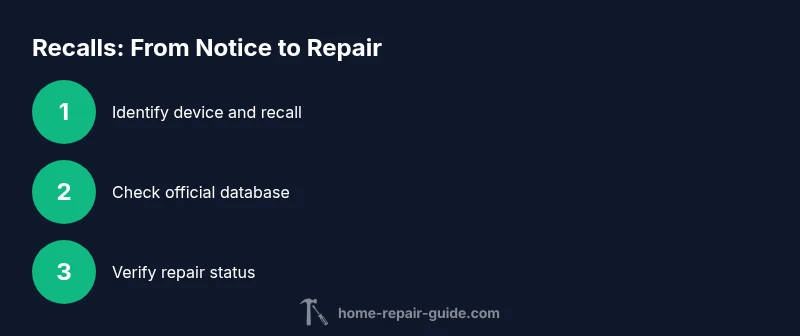
Checking for repaired recalls is a pro‑active safety practice for any homeowner. It ensures that critical safety issues have been resolved by the original manufacturer or an authorized technician, reducing the risk of fire, shock, or other hazards. According to Home Repair Guide, the most reliable way to verify repair status is to cross‑check official recall records with your device’s unique identifiers and the service paperwork. This approach not only protects your household but also helps you document compliance for resale, insurance, or warranty purposes. By understanding the lifecycle of a recall—from initial notice to repair completion—you gain confidence in using your appliances safely and responsibly.
How recalls work and why repairs matter
recalls are issued when a product is found to pose a safety risk. When a recall is announced, the manufacturer typically offers a repair, replacement, or refund at no cost to the owner. Repairs are performed by authorized technicians to ensure the fix meets safety standards. The Home Repair Guide team emphasizes that verifying a completed repair protects family members and preserves appliance longevity. A successful repair reduces ongoing risk and can extend the useful life of a device when done correctly.
Where to find official recall information
Official recall information is published by government agencies and manufacturers. In the United States, the Consumer Product Safety Commission (CPSC) maintains an online recalls database, while many manufacturers host recall notices on their own sites. Always start with the primary, government‑backed source for accuracy, then cross‑check the manufacturer’s records for specifics about the repair. For vehicles, a separate agency database exists, but the same reliability principle applies: trust primary sources first and verify with the installer.
How to locate your appliance's model and serial number
Before you can search recall databases, you must locate your device’s model and serial number. These identifiers are usually found on a label near the back, inside a panel, or behind a removable access door. Write down the exact characters and note the purchase year if available. Having this data on hand speeds up the lookup process and reduces the chance of querying a wrong model. If you bought a used item, request any available recall documentation from the previous owner.
Step-by-step: using recall databases to check status
A thorough check involves multiple sources. Start with the official recall database for your region (for example, the CPSC in the U.S.). Enter the model, serial number, and product category to retrieve recall notices. Review each entry for the repair status, repair date, and the service provider. If a repair is listed as completed, verify the parts used and the technician’s credentials. Keep a copy of each entry for future reference.
Verifying repair status with the manufacturer and service provider
After locating a recall entry, contact the manufacturer or an authorized service center to confirm the repair status. Request a repair certificate or service invoice showing the date, parts replaced, and technician license number if applicable. Some recalls may require re‑inspection or follow‑up actions; confirm whether any additional steps are needed to maintain compliance. Retain digital copies and physical paperwork for warranty eligibility or resale documentation.
What to do if the recall status is unclear or missing
If the recall entry lacks a clear status, or your device isn’t listed, use alternative verification channels. Call or email the manufacturer with your model/serial number and proof of purchase. You can also check consumer safety portals or consumer protection groups for guidance on unlisted recalls. Do not assume a device is safe based on appearance alone; obtain written confirmation from a trusted source.
Documentation and record-keeping for recalls
Maintain a dedicated recall file that houses the recall notice, repair certificates, parts lists, and technician credentials. Digital scans are easy to store in cloud drives, while paper copies are useful for filing with insurers or when selling the home. Schedule periodic reviews of your appliance inventory to catch newly issued recalls that may affect your devices. Structured records simplify future maintenance and safety audits.
Safety considerations and when to stop using a device
If a repair has not been performed or the status remains uncertain, prioritize safety. Unrepaired recalls can continue to pose hazards, so consider powering down or disconnecting the device until proper verification occurs. For high‑risk appliances, consult a professional before resuming operation. When in doubt, err on the side of caution and remove the device from daily use until clearance.
Common pitfalls and best practices
Common mistakes include relying on memory rather than documentation, checking only one source, and overlooking regional differences in recall management. Best practices involve using official databases, verifying with authorized technicians, and keeping all receipts in a dedicated file. Regularly review your home inventory for aging appliances and set reminders to recheck recalls periodically.
Authority sources
- Official recall portals (e.g., cpsc.gov/Recalls)
- Manufacturer recall pages and service records
- National consumer safety guidelines and advisories
Tools & Materials
- Smartphone or computer with internet access(Needed to search recall databases and contact manufacturers.)
- Appliance owner’s manual or device documentation(Contains model, serial number, and purchase details.)
- Notebook or digital note system(Record search results and repair confirmations.)
- Proof of purchase or warranty documents(Helpful for confirming eligibility and ownership.)
- Camera or scanner for paperwork(Digitize receipts and certificates.)
Steps
Estimated time: 40-60 minutes
- 1
Gather device identifiers
Locate the model and serial number on the device label, then pull up the purchase date and place of purchase if available. This information is essential for accurate recall lookups and for communicating with manufacturers.
Tip: Check all labels on the device and any packaging to avoid using the wrong identifiers. - 2
Locate official recall databases
Open the primary government recall portal for your region (for example, a national safety agency) and the manufacturer’s recall page. Use your device category and identifiers to run targeted searches.
Tip: Bookmark official sources to speed future checks and avoid third‑party sites with outdated info. - 3
Search by model/serial and product type
Enter the exact model and serial number, then filter results by product type (e.g., dishwasher, thermostat, furnace). Review all entries returned for related recalls.
Tip: If you see multiple recalls, address the most recent or highest‑risk item first. - 4
Review repair status in each listing
Look for status terms like repaired, completed, or no action required. Note any dates of repair and the service provider involved.
Tip: If the status is unclear, proceed to step five for direct verification. - 5
Verify repair with manufacturer or service center
Contact the manufacturer or an authorized technician to confirm the repair details, including parts used and the technician license number if applicable.
Tip: Ask for a written repair certificate or invoice for your records. - 6
Cross‑check parts and safety outcomes
If parts were replaced, confirm compatibility with current safety standards and that any updates were included in the repair bulletin.
Tip: Keep a copy of part numbers for future reference or warranty claims. - 7
Document and store all records
Create a dedicated file (digital or physical) containing recall notices, repair certificates, and receipts. Store them securely for insurance or resale needs.
Tip: Set regular reminders to recheck recalls on later dates. - 8
Take action if unrepaired or unclear
If you cannot confirm a repair, stop using the device if it poses a risk and contact the manufacturer or a licensed technician to arrange verification or service.
Tip: Do not rely on assumption; obtain formal confirmation before resuming use.
FAQ
What should I do if the recall status shows unrepaired?
If a recall is listed as unrepaired, contact the manufacturer or an authorized service provider to arrange repair. Do not use the device until it has been repaired or a safe alternative is identified.
If the recall shows unrepaired, contact the manufacturer to schedule the repair and stop using the device until it’s fixed.
How can I confirm a repair was performed by an authorized technician?
Request the repair certificate or invoice showing the technician’s license details and the parts replaced. Check that the repair aligns with the official bulletin and that the technician is listed as authorized by the manufacturer.
Ask for proof of repair and technician credentials to confirm it was done correctly.
What if the recall isn’t listed on the official site?
If a recall isn’t listed, contact the manufacturer with your model/serial number and purchase details. You can also check consumer safety portals for guidance on unlisted recalls.
If it isn’t listed, work with the manufacturer to verify safety and consider a professional inspection.
Are recalls always covered by the manufacturer at no cost?
Most recalls are repaired at no cost to the owner, but confirm eligibility with the manufacturer and read the official bulletin for scope and limits.
Yes, recalls are typically free, but verify coverage details with the maker.
Can I use the appliance while awaiting recall repair?
If the recall poses a real safety risk, stop using the appliance until repair is completed. For less critical recalls, follow the manufacturer’s safety guidance while awaiting service.
Don’t use a device that has an active recall until it’s repaired.
What documentation should I keep after a recall repair?
Keep the repair certificate, parts list, and official recall notice. Store receipts and warranty information to support future claims or resale.
Save all repair records for safety and warranty purposes.
Watch Video
Key Takeaways
- Verify recalls with official databases first.
- Save repair certificates and receipts.
- Document everything for safety and resale.